| Can only sell to experimental aircraft. Certified aircraft must go to Part 145 Garmin shop to install. Advanced Connectivity and Revolutionary Avionics Integration
|
|
| Experience the revolutionary cockpit connectivity of patented technology with Flight Stream 510. A game-changing addition to the Connext platform, Flight Stream 510 pairs with your GTN 650 and GTN 750 series navigators to add greater flexibility and convenience both inside and outside of the cockpitto save you time and workload. It requires no wiring changes or complex installation considerations, yet it allows you to more easily manage your database subscriptions via the Garmin Pilot appwhile also enabling wireless flight plan transfer with your GTN, sharing of traffic, weather, GPS and more. And if you have G500 or G600 glass flight displays paired with a GTN, Flight Stream 510 even wirelessly displays back-up attitude information on a mobile device. | |
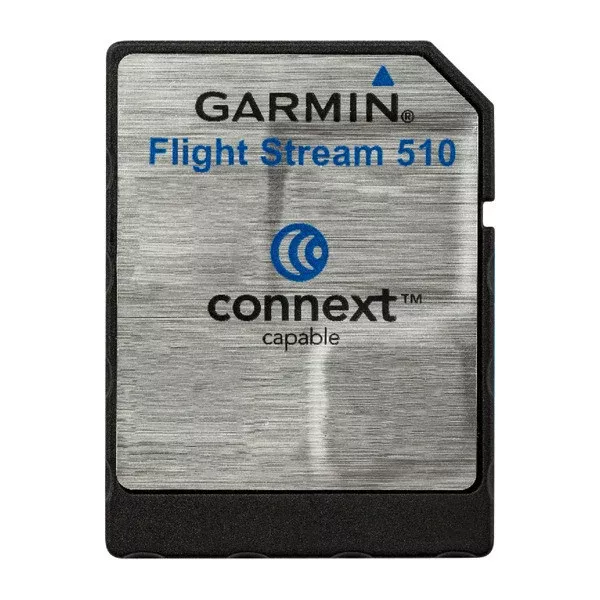
Improving the Connected CockpitCost-effective and non-intrusive, Flight Stream 510 is a patented memory card that contains Wi-Fi and Bluetooth® connectivity capability. When installed in the slot of a GTN 650/750 series navigator, Flight Stream can be connected with up to 2 compatible Apple or Android mobile devices operating Garmin Pilot as well as Garmin aera® 660, aera 795 and aera 796 portables. The wireless connection enables Database Concierge wireless database transfer. At home, you can select individual databases (including Jeppesen® NavData or Garmin Navigation Database, Obstacle, Terrain, SafeTaxi®, FliteCharts®, Basemap and the AOPA Airport Directory) on the Garmin Pilot app, download them and then store them to your mobile device for later use. Once Flight Stream 510 establishes a wireless connection in the airplane, it transfers your up-to-date databases directly to the GTN in minutes, where theyll wait in standby until their effective date. For added flexibility, a USB card reader is provided to customers who would like to download databases directly to the Flight Stream 510 card using a computer. |
|
Staying in SyncIf you have multiple GTNs or G500/G600 glass flight displays, youll enjoy additional benefits from database synchronization. The GTN acts like a computer server to automatically transfer and synchronize your databases to the flight display and navigator, behind the scenes. In the meantime, you can view and use a departure, approach and arrival chart immediatelyeven if the databases are still synchronizing. |
|
Communication ControlFlight Stream 510 makes it easier to stay connected with your loved ones on the ground, too. When you run Garmin Pilot on a compatible Apple mobile device, you can pair it to your GTN with an optional GSR 56 datalink and access text and voice services both in-flight and on the ground over the Connext network (subscription required). That means you can easily send and receive messages with your deviceand even use its existing contact databaseas well as complete phone calls through your headset. |
Streaming Situational AwarenessComplete your flight plan in the comfort of home or the FBO lounge on the Garmin Pilot, ForeFlight Mobile or FltPlan Go apps. Then, with only a few taps, wirelessly transfer it in seconds to the GTN over the Flight Stream 510 Bluetooth connectionand give yourself more time for other preflight activities prior to departure. Garmin Pilot will even prompt you if there are any changes to your flight plan by ATC so you can automatically send that amendment to your navigator. And if you need to alter your flight plan en route, you can make the change on 1 device and quickly sync it on the other. Plus, you can share GPS position information from your GTN navigator to display precise position information on mobile devices.And with a G500/G600 flight display, you can also |
Related products
Sale!
Switlik X Back LEG Straps SET OF 2Original price was: $67.30.$35.59Current price is: $35.59.
Sale!
Brightline SSE BAG Shoulder Strap Extension SETOriginal price was: $12.83.$6.52Current price is: $6.52.
Sale!
Kannad Programming Dongle Integra / SAOriginal price was: $771.77.$436.92Current price is: $436.92.
Sale!
86261 Alcor CHT Reference Thermocouple FOR Alcal 2000Original price was: $127.66.$76.36Current price is: $76.36.
Sale!
True Blue Power Service Cable TB44 9018044Original price was: $215.10.$116.59Current price is: $116.59.
Sale!
75736 Lycoming OIL Level Gage Tube (11.57 Long)Original price was: $152.71.$93.66Current price is: $93.66. |